
Case History
Convergence tracks the date, time, and current user for most activities, including editing data fields, file uploads, sending email, generating documents, scheduling events, and adding notes. Clicking 'Case History' in the popup menu will take you to a page listing all the recorded activity in Convergence in chronological order. Each entry contains a description, a date and time, and the name of the user who performed the activity. Below is a sample case history from our demo database.
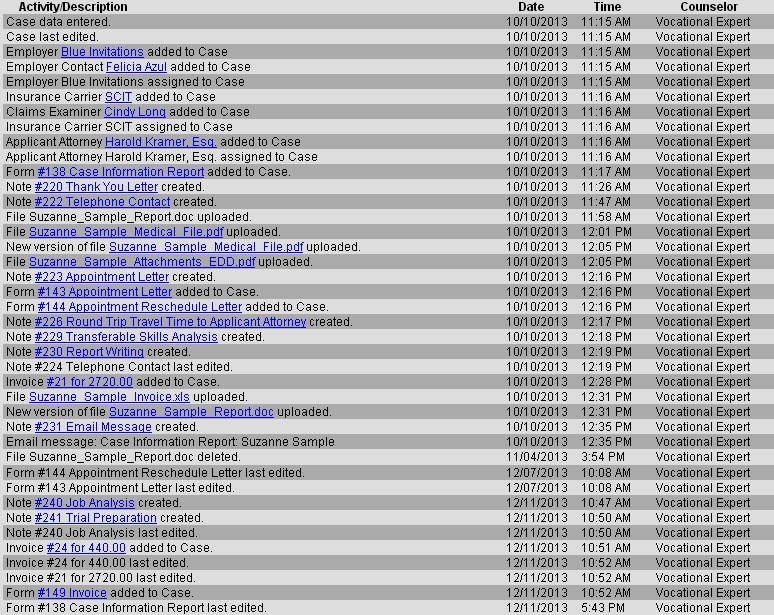
Where applicable, notes, organizations/contacts, documents, or invoices are linked to the item in question. If you are wondering what document it was that got uploaded, or want another look at a case contact in the history, these links will take you right to the page for that item, or download a file if the link is to an uploaded file.
This manual is published by Convergence Case Management Data Retrieval Software, LLC, whose software products are provided for use by parties who have paid for and have a current license to operate the software described herein.
Information in this manual is subject to change without notice, and does not represent any commitment on the part of Convergence Case Management Data Retrieval Software, LLC. The software described in this manual is furnished under a license agreement and may be used only in accordance with its terms and conditions.
© Copyright 2026 Convergence Case Management Data Retrieval Software, LLC
This manual contains propietary information which is protected by Copyright. No part of this document may be reproduced, translated into any language or computer language, or transmitted in any form whatsoever without the prior written consent of Convergence Case Management Data Retrieval Software, LLC.